
AMD’s RX 7000v and NVIDIA’s RTX 4000 Series have some exceptional graphics cards that are restricted by their prices.
Even NVIDIA’s mid-tier GPU, the RTX 4070 is now $600, a hundred dollars more costly than the RTX 3070. NVIDIA’s mid-range back in 2016 with the 10 Series was $380. Yes, that’s how much the GTX 1070 cost.
Either way, even with this significant price tag, it’s still one of the better-value GPUs out of the RTX 4000 Series. So, if you’re planning to spend $600 on a GPU, you will probably want to ensure you get the variant that performs in all areas.
So, let’s have a look at some of the leading RTX 4070 graphics cards!

ASUS GeForce RTX 4070 TUF
Interface: 3 x DisplayPort 1.4a, 1 x HDMI 2.1rnBoost Clock: 2580 MHzrnDimensions: L: 301 W: 139 H: 69 mm
The Pros:
- Incredibly quietrnStays cool throughout any task
The Cons:
- No apparent downsides
TUF is one of the mid-range coolers for ASUS GPUs, so it is typically a reliable option for anyone that doesn’t want to pay a huge premium for an AIB GPU.
Pricing
The ASUS RTX 4070 TUF price is usually at the $680 mark, so $80 more than NVIDIA’s MSRP. We expected a price of around $650, but if it performs well enough, the additional $30 might be justifiable.
Design
The cooler design has nothing notable to report, it’s a black-on-black shroud, but it gives quite a premium feel and look. It is not too heavy, weighing 1180g. Unlike most RTX 40 GPUs, this GPU uses a conventional single 8-pin connector rather than the 12VHPWR connector.
But, since it is a triple fan cooler, it measures 301mm in total length.
Performance And Overclocking Capabilities
The ASUS GeForce RTX 4070 TUF’s boost clock is approximately the 2780 MHz mark during gaming, that’s roughly 7% greater MHz than advertised.
Getting more FPS out of the TUF card is also achievable by bumping up the GPU clock up to 2930 MHz and the Memory Clock to 1400 MHz. This type of overclock will get you around 5% extra FPS in-game.
Table of ContentsShow
Thermals And Acoustics
While other RTX 4070 AIBs might have an enhanced overclocking potential, only a few can be comparable to ASUS’ TUF cooling performance.
Running the TUF RTX 4070 at stock settings, the GPU’s average temperature is 60 degrees Celsius. What makes the GPU even more outstanding is that its noise levels stay around 23 dBA on normal while in-game.
The RTX 4070 is exceptionally efficient and ASUS has utilized this effectiveness to its fullest!
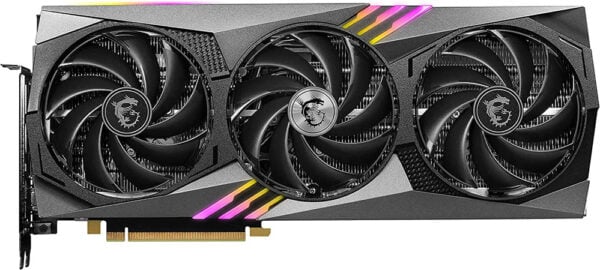
MSI GeForce RTX 4070 Gaming X Trio
Interface: 3 x DisplayPort 1.4a, 1 x HDMI 2.1rnBoost Clock: 2610 MHzrnDimensions: L: 338 W: 141 H: 52 mm
The Pros:
- Overclocks incredibly wellrnAmazing factory overclockrnStays quiet and cool throughout any task
The Cons:
- No disadvantages
MSI’s Gaming X Trio is one of our most frequently praised AIB coolers, usually because it excels in all aspects. Considering how efficient the 4070 is, it shouldn’t be a challenge for the Gaming X.
Pricing
The MSI RTX 4070 Gaming X Trio comes $30 cheaper than ASUS’ card, so $650, $50 over MSRP, which is already a significant advantage.
Design
The Gaming X Trio’s design remains almost unchanged and gets minor facelifts throughout new GPU generations. Either way, the cooler’s look isn’t much different from most other third-party cards.
It’s a triple-fan setup with a dark shroud on the front, sides, and back. It weighs around 1.2kg and it uses the new 12VHPWR connector instead of the conventional 8-pin connectors.
Performance And Overclocking Capabilities
The Gaming X Trio’s GPU clock average is surprisingly identical to the ASUS TUF. In-game, clocks reach up to 2900 MHz and then settle down around the 2860 MHz mark. That’s 10% higher than the specified boost clock!
And despite having a remarkably outstanding factory overclock, you can further increase the GPU clock.
Based on what we’ve seen on tested RTX 4070 Gaming X Trios, a significant overclock can get the GPU clocks over 3000 MHz and the memory clock speeds up to 1540 MHz. It is one of the finest overclockers even when compared to more premium models.
Thermals And Acoustics
Even with the outstanding out-of-the-box clock speeds, the Gaming X Trio also leaves a favorable impression with its cooling too.
At stock settings, the card produces an average of 25.6 decibels and temperatures sit at 62 degrees Celsius. It’s only marginally louder than the RTX 4070 TUF, but that’s anticipated considering how well it clocks.
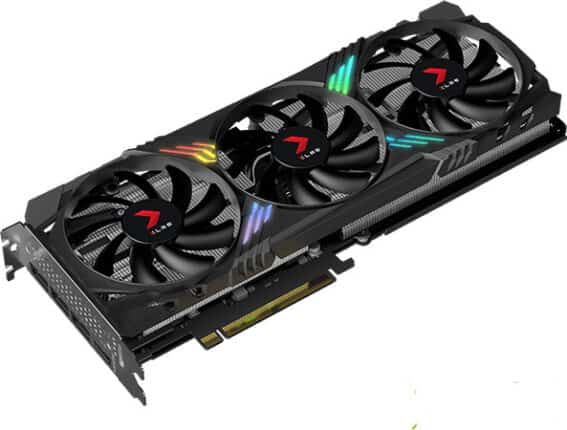
PNY GeForce RTX 4070 XLR8
Interface: 3 x DisplayPort 1.4a, 1 x HDMI 2.1rnBoost Clock: 2475 MHzrnDimensions: L: 305.1 W: 119.4 H: 40 mm
The Pros:
- Dual slot GPUrnLightrnVery quiet
The Cons:
- Not as great an overclocker as ASUS or MSI
PNY’s GeForce RTX 4070 XLR8 is one of the 4070 that merits being on this list, but let’s see precisely why!
Pricing
There isn’t an exact MSRP for PNY’s GPU, but we’ve seen it sell as low as $620 and go as high as $680. When closer to the reduced end of the price range, the PNY is a no-brainer. For $650 or more, the MSI or ASUS options are better.
Design
Like MSI or ASUS, the RTX 4070 XLR8 is a triple-fan GPU with a predominantly black shroud. However, its design isn’t as simple as the shroud a lot more jagged and sharp edges. It looks appealing, but it might not be to everyone’s taste.
However, one substantial advantage PNY’s card has over other AIB manufacturers is the weight and size. It’s an excellent choice for a small and lightweight PC since it weighs only 850g and takes up just two slots. It also has a regular 8-pin power connector.
Performance And Overclocking Capabilities
Even though it’s so compact than other RTX 4070 variants and it’s slimmer, PNY’s stock settings get the card’s boost clock up to 2770 MHz. Not bad considering the advertised specifications are 2475 MHz!
Furthermore, overclocking can get the standard GPU clocks up to 2830 MHz with the Memory Clock up to 1550 MHz. The GPU clocks may not go exceptionally high, but the overclockable memory does compensate in this scenario, ultimately leading to 6% extra FPS in-game.
Thermals And Acoustics
The in-game average temperature is about 67 degrees Centigrade, which is a bit elevated than the other RTX 4070 variants we mentioned, however, noise levels are comparatively low, with an average of just 24 decibels. So, that extra temperature is justified.

MSI GeForce RTX 4070 Ventus 3X
Interface: 3 x DisplayPort 1.4a, 1 x HDMI 2.1rnBoost Clock: 2505 MHzrnDimensions: L: 308 1 W: 120 H: 43 mm
The Pros:
- Cheapest of the bunchrnMaintains solid thermals and noise levels
The Cons:
- Sub-par factory OC and overall overclocking
The MSI GeForce RTX 4070 Ventus 3X is one of MSI’s more affordable options for the RTX 4070, but it is still an excellent pick, you’ll see why.
Pricing
Out of all four GPUs on this list, the Ventus 3X offers the highest performance per dollar since it uses NVIDIA’s MSRP of $600.
For anyone looking to save $50 when buying a GPU, the Ventus 3X is the perfect selection.
Design
The design of this GPU does remind a bit of the Gaming X Trio, but the absence of premium materials is noticeable. Although it is still a triple-fan cooler, with a gray and metallic shroud and a dark backplate.
It’s also relatively lightweight, at 816g, and has the typical 8-pin power connection.
Performance And Overclocking Capabilities
The MSI RTX 4070 Ventus 3X has the lowest average clock speeds out of the four GPUs on this list, about 2720 MHz.
However, that shouldn’t stray you away from the card because, with a stable overclock, you can get it up to 2850Mhz, netting you about 5% to 6% extra FPS in-game, while saving $50.
Thermals And Acoustics
And even though it is marginally behind in clock speeds, the cooling is superb. The average noise level is 28 dBA and temperature levels stay around 64°C.
Not as noteworthy as the Gaming X Trio, but outstanding enough for an AIB at NVIDIA’s MSRP.
Which RTX 4070 Should You Get?
So with so much data and statistics out of the way, should you go with MSI, ASUS, or PNY when buying an RTX 4070 GPU?
Well, if you’re looking for the Best Value GPU, we recommend MSI’s GeForce RTX 4070 Ventus 3X because it will perform as effectively as any other RTX 4070 for $600.
However, we also recommend spending those extra $50 to get the MSI GeForce RTX 4070 Gaming X Trio because it does everything right. It’s quick, cool, and appealing, it’s the Best Overall.
Just because we favored MSI’s GPUs this time around, doesn’t mean that you shouldn’t consider checking out ASUS’ GPU. It costs more, but it’s also one of the most silent coolers we’ve encountered yet.
If you can find the PNY’s RTX 4070 XLR8 for $620, it might offer superior value than the Ventus 3X since it clocks faster and it’s more silent.


