
If you’re a PC gamer, you’ve almost certainly encountered or heard of screen tearing. This visual issue has plagued us since the performance of graphics cards began increasing rapidly, and monitors struggled to keep up. Both FreeSync and G-Sync have addressed this challenge, but which is superior? Read on to find out.
Before we dive in, we first need to understand the issue to find the ideal solution for it.
Table of ContentsShow
Screen Tearing
So what leads to screen tearing? Essentially, this problem arises when the GPU is trying to generate more frames than the monitor can display.
For example, a GPU producing 100 FPS would be essentially useless on a 60Hz monitor, as the figures don’t align with each other.
The monitor will try to display the 100 frames produced by the graphics card each second, but it will be unable to, as it’s only able to refresh itself 60 times per second.
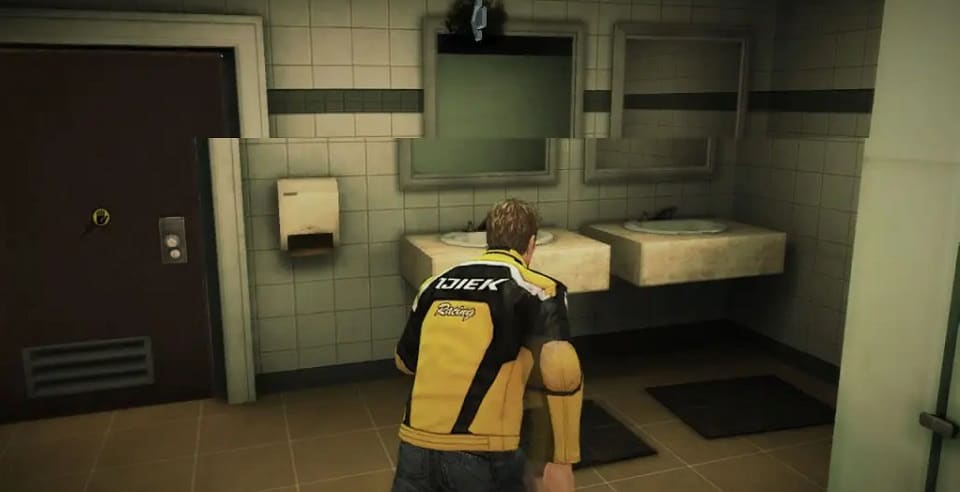
This effect often occurs when images move horizontally, which frequently happens in side-scrolling games and first-person shooters, where it can be especially troublesome.
Screen tearing can instantly destroy the in-game experience by reminding you that you’re sitting in front of your computer and playing a game. This breaking of immersion has been observed and described by countless people back when this issue was at its most frequent.
Being absorbed in a game should make you forget your surroundings. Screen tearing reminds gamers of glitches and makes them concerned that there’s something wrong with their PC. This brief distraction is often enough to get you killed in-game.
No player relishes it when they lose because of something beyond their direct control.
Enter VSync.
Vertical Synchronization (VSync)

VSync is a technological solution that prevents screen tearing by limiting the GPU’s output to match the monitor’s refresh rate.
Great! Problem resolved, right? Not exactly.
VSync attempts to lock the images rendered by the GPU to the monitor’s refresh rate. What occurs if the frame rate drops below that refresh rate threshold, which is typically 60Hz?
As VSync can’t interact with the display, nothing can be done in that situation. Instead of screen tearing, there is a recent problem: the monitor needs to wait for a current frame to render while leaving the previous one on the screen, leading to some strange stuttering.
Both AMD and Nvidia initially developed a solution called Adaptive VSync, which affects performance by using its software. Adaptive VSync turns VSync off when the graphics card isn’t producing sufficient frames to match the monitor’s refresh rate and activates it when the opposite is true.

Adaptive VSync was a relatively simple solution by modern standards, but it worked. However, both the green and red teams felt that they could devise something superior.
Let’s examine their determinations.
G-Sync

In 2013, Nvidia was the first company to debut its solution: the GeForce GTX 650 Ti Boost card. With the considerable gap between Nvidia’s and AMD’s technology being released, it might appear that Nvidia invented this innovation, but that is not the case.
As mentioned previously, the concept existed long before Nvidia’s G-Sync and AMD’s FreeSync, but both companies used a distinct approach to it.
G-Sync is comparable to VSync as it limits the surplus frames being shown if the monitor can’t handle it. However, the hardware solution presented by Nvidia – available exclusively on their cards – is the significant breakthrough here.

Nvidia also made monitor manufacturers pay an extra fee to access the G-Sync module, which enables them to run the tech on their displays.
This choice model enabled G-Sync to take control of the monitor’s refresh rate and the number of frames rendered by the GPU. For example, if the GPU renders 40 FPS, G-Sync will adjust the monitor’s refresh rate to 40Hz to maintain flawless synchronization.
However, if the GPU pushes the game’s frame rate beyond the monitor’s refresh rate, G-Sync will not influence the FPS.
Before examining the subsequent manifestations of G-Sync, let’s take a look at AMD’s comparable solution to compare the two.
FreeSync

Like G-Sync, AMD’s FreeSync is a step up from VSync and performs very similarly to Nvidia’s tech. In other words, it synchronizes the monitor’s refresh rate with the GPU’s real output.
Despite sounding relatively similar and delivering essentially the same result, there is a reason why FreeSync is generally considered the favored option.
As mentioned earlier, Nvidia makes manufacturers pay for the dedicated G-Sync module. Although a similar certification is required for monitors to be FreeSync compatible, the difference is that FreeSync, as its name suggests, is complimentary.
Display makers don’t need to pay an additional fee to be FreeSync certified, meaning consumers are not charged extra either.
Some in the tech industry have equated this to highway robbery and called it a predatory practice because Nvidia was the first to market this solution roughly two years before, which is a substantial time in the tech world.

People’s reservations toward Nvidia stem from the fact that they haven’t made G-Sync complimentary, even after FreeSync was released in 2015. They are well within their rights to take this stance, and AMD’s free release of their technology was likely a marketing strategy to compete with Nvidia. Still, some concessions were anticipated after FreeSync hit the market.
A possible reason for keeping their proprietary module is their control of the GPU market, which allows them to maintain their price. It can be easy to throw shade at Nvidia, but there are legitimate reasons to pay for G-Sync.
We’re referring to Nvidia’s strict certification rules for G-Sync. The issue with FreeSync is that its label can be applied more freely, even when a monitor’s range is as low as 50-80Hz. This means refresh rate synchronization will only be available between 50 and 80 frames per second. Below or above that range, there’s no synchronization at all.
We’ll look at AMD’s solution for that but, notably, fundamental G-Sync requires that monitor manufacturers go virtually unrestricted with their G-Sync capabilities. This means that if your game is running at 20 FPS, there won’t be any screen tearing or stuttering. The same applies if you’re gaming at 200 FPS.
AMD is not without fault in this rivalry. The main issue is that they don’t require monitor manufacturers to declare where their range lies. They need to do it if it’s a flagship monitor so they can boast about it, but if they’re releasing a budget or even mid-range monitor, it’s entirely possible that you will be kept in the dark about the precise range.
Another benefit of FreeSync over G-Sync is that it can work with HDMI as well as DisplayPort, while Nvidia’s technology exclusively works with DisplayPort.
Variations
Any decent tech that has existed for a while is bound to have various iterations which further enhance its original design. Both AMD and Nvidia have released updates on their respective technologies. We’ll now examine them individually.
G-Sync Compatible

Let’s start with something that might change your perception of Nvidia. First announced at CES 2019, G-Sync Compatible offered to make any adaptive sync monitor (including those certified by FreeSync) able to run G-Sync, for no extra cost to either the manufacturer or the buyer.
When this was initially disclosed, Nvidia stated that they had tested hundreds of monitors and only certified 12 of them. They have since added five extra monitors to that list. However, this isn’t without its drawbacks.
Nvidia conveniently fails to mention that, while it’s technically possible to run G-Sync Compatible with any adaptive sync monitor, there are often problems involved. Random blanking or stuttering is enough to make hardware unusable, and it’s a probable occurrence if you try using it with a non-certified monitor.
FreeSync Premium

Don’t be disheartened by this name. AMD has stayed true to its free policy.
Premium is undoubtedly an improvement when compared to the basic FreeSync, due to features such as the low framerate compensation (LFC), which fixes the range issue but only to a certain extent.
It does this by altering the monitor’s refresh rate if the GPU’s output dips below the monitor’s FreeSync range. This is done by compensating for the dip, meaning if the range is 40-80Hz and FPS drops to 30, FreeSync Premium will adjust the monitor’s refresh rate to 60Hz. This is not a flawless fix, but it has operated thus far.
Another way AMD seeks to enhance the range issue is with Premium certification. They state that for a monitor to support LFC and FreeSync Premium, they require a span of 2.5 or greater. This means that when the highest limit of the range is divided by the minimum limit, it must not be beneath 2.5.
G-Sync Ultimate

Released at the same time as G-Sync Compatible, at the 2019 CES, G-Sync Ultimate promised to add numerous groundbreaking features to the already robust G-Sync tech.
One of the main talking points is its 1400 nits HDR. This enables G-Sync to score much higher in terms of luminosity and provide an even sharper image.
Other capabilities of Ultimate include refresh rate overclocking, variable overdrive, ultra-low motion blur display modes, full matrix backlight, and DCI-P3 color.
The most surprising aspect of all is the groundbreaking refresh rate overclocking. Overclocking CPUs and GPUs is ancient history but overclocking monitors is very beneficial as it could save you a lot of money.
FreeSync Premium Pro

FreeSync Premium further enhanced the original FreeSync formula from AMD. It retains its predecessor’s LFC capabilities and promises to deliver the ideal HDR experience on the AMD side.
However, its 400 nits promise was a major disappointment compared to the previously mentioned 1400 nits from the competitor’s G-Sync Ultimate.
Which One Is The Best?
Considering the various versions, it can’t be said outright which solution is superior. To help you decide, we’ll compare the different versions with their comparable competition.
The bottom tier is between G-Sync Compatible and FreeSync. While Nvidia offered variations above and below the base G-Sync tech, AMD enhanced their original design, so these two are fairly equivalent. Due to its availability and despite the lack of extra expense on both sides, FreeSync is our choice here.
In the middle ground, we have FreeSync Premium and G-Sync. These are probably the most complex options to choose between. While G-Sync is technically a superior technology, FreeSync Premium has the advantage of being free. In this case, you should probably make a personal decision based on your budget.
At the top, we have G-Sync Ultimate and FreeSync Premium Pro, and there is a very clear winner. Although FreeSync Premium Pro is free and a decent solution, G-Sync Ultimate is far superior tech and worth the additional cost.
Overall, if you’re getting a new monitor or GPU, in addition to being aware of each side’s refresh rate synchronization capabilities, you should remember that, depending on your financial means, there is a solution out there for everyone.


